getquin review 2026: is this portfolio tracker worth it?



In this review, we look at getquin, a Berlin-based app that brings your brokers, bank accounts and other assets into one dashboard. We cover what the free plan includes, what you get with Premium and Wealth, which European brokers connect, how your data is handled and which alternatives may suit you better.
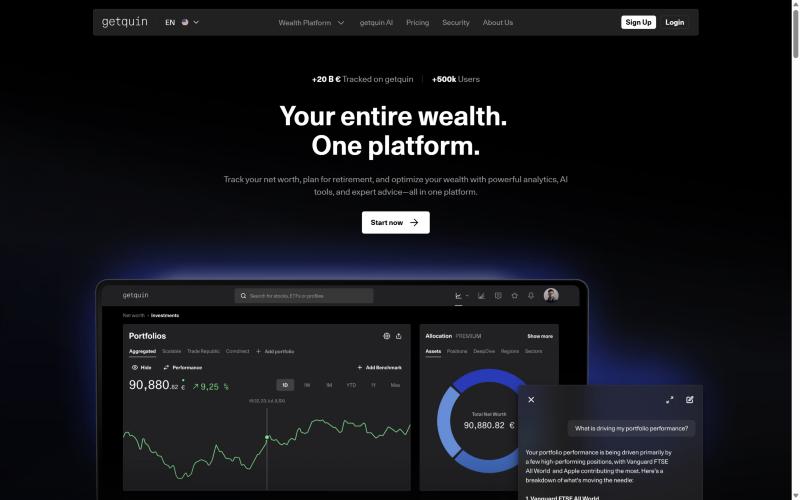
getquin was founded in 2020 and says it has more than 500,000 users and over €20 billion in tracked assets. In May 2026 it raised a €12 million round led by State Street Investment Management and Portage, and it now presents itself as a "wealth platform" with AI tools and paid advice. The core product is still a portfolio tracker, and that is where we focus.
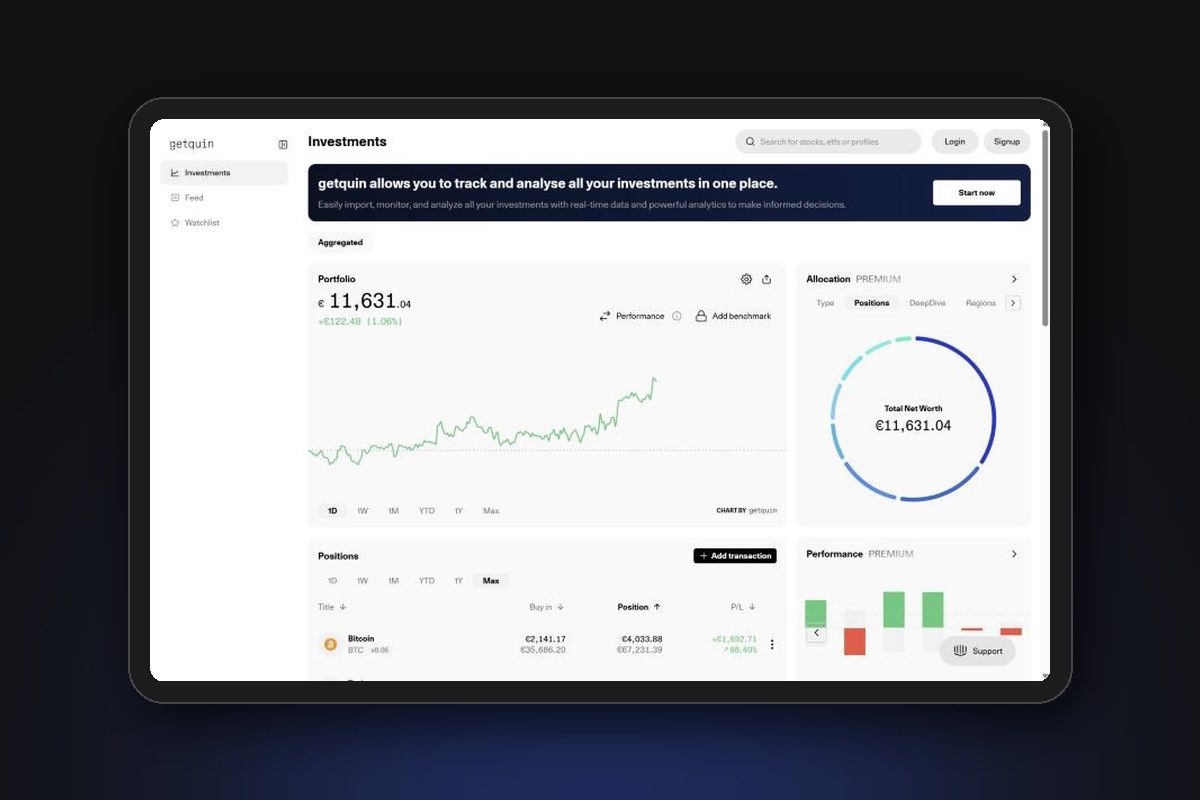
All prices and features below were checked on getquin's website, help centre and terms in November 2026. The screenshots come from getquin's public demo portfolio, so the figures you see are sample data.
Overview
getquin is operated by QUIN Technologies GmbH, registered in Berlin (Amtsgericht Charlottenburg, HRB 217297 B). The managing directors are the co-founders Christian Rokitta and Raphael Steil. The app is available in English and German, on the web, iOS and Android.
The idea is simple: instead of opening five apps to see how your money is doing, you connect your accounts once and getquin shows everything in one place:
- Stocks, ETFs, funds and bonds from connected brokers or imported files, plus crypto
- Cash in bank accounts
- Debts, loans and mortgages, so you see your net worth and not only your investments
- Alternative assets you add by hand, such as art, cars, P2P loans or start-up stakes
getquin also runs a social feed where users post about stocks and markets. Most of the activity is in German, with an automatic translation button for other languages. You can switch the feed off if you only want the tracker.
Highlights
Sources: (1) getquin pricing page, (2) free trial help article, (3) portfolio import help centre, (4) getquin security page. App ratings from the Apple App Store (Germany), Google Play and Trustpilot. All checked November 2026.
Pros and cons
Pros
- Unlimited broker and bank connections on the free plan (rivals such as Parqet cap the free plan at 2 integrations)
- Good coverage of the brokers Europeans actually use, from Trade Republic and Scalable Capital to Interactive Brokers and DEGIRO
- Shows your full net worth: investments, cash, debts and manual assets
- Proper performance metrics (IRR and TTWROR), not just a simple gain/loss figure
- Clean web and mobile apps, rated 4.5/5 on the German App Store
- Read-only access: the app can see your accounts but cannot trade or withdraw
- Data hosted in Germany and Europe
- You can export your portfolio as a CSV file, so your data is not locked in
Cons
- Dividend forecasts, detailed allocation and advanced performance analysis are locked behind Premium
- The website lists annual prices only, so the yearly cost is due upfront
- The free trial turns into an annual subscription automatically if you forget to cancel at least 24 hours before it ends
- Automatic connections usually import only your current holdings, not the full history, and need a new login every 90 days
- Alternative assets (art, cars, P2P) must be priced by hand
- The AI file import sends documents to OpenAI by default (you can switch it off before uploading)
- The app shows ads, and the community feed is mostly German
Pricing: Free vs Premium vs Wealth
getquin has three plans, all billed per year. Prices on the website exclude country-specific taxes, which are added at checkout.
Source: getquin pricing page, November 2026. Prices exclude country-specific taxes.
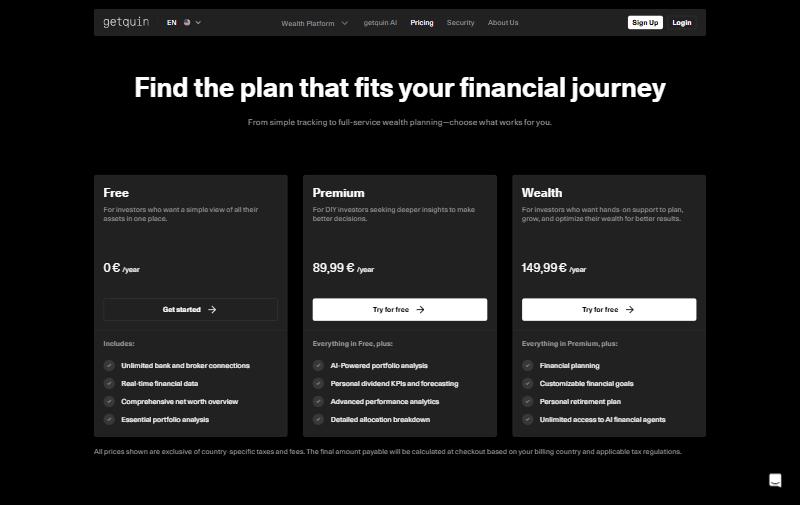
In monthly terms, Premium works out at about €7.50 and Wealth at about €12.50. For comparison, Parqet's Plus plan costs €11.99 per month (with three months free on annual billing), and Snowball Analytics starts at $79.99 per year.
The free trial
Premium comes with a 7-day free trial, one per user. You can start it during onboarding, when you tap a locked feature or from the settings. If you do not cancel at least 24 hours before the 7 days end, it converts into an annual subscription. Deleting your account does not cancel the trial: you need to cancel it in the App Store, Google Play or, on the web, through Stripe.
Cancelling a subscription
You cancel by switching off automatic renewal in your account settings. The plan stays active until the end of the paid period, with no partial refunds. Annual plans renew at the non-discounted price, so check the renewal amount if you joined during a promotion. EU consumers also have the legal 14-day right of withdrawal.
Is Premium worth it?
The free plan is enough to see everything in one place and track your overall return. Premium is worth it mainly for two groups: dividend investors who want a forecast of future payments, and investors who want a detailed breakdown by region, sector or holding inside their ETFs. If you only want to know "how much do I have and how is it doing", the free plan covers it.
getquin advisory: a separate paid service
Besides the app plans, getquin sells financial advice by video call and email for €499 per year (VAT included), covering ongoing planning and portfolio reviews. It is provided by getquin's own advisers under a German trade licence for financial investment advice (§ 34f GewO), not a BaFin banking or investment firm licence. getquin also works as an insurance broker (§ 34d GewO), paid through commissions from insurers. This advisory offer is separate from the Premium and Wealth subscriptions.
How importing works
Getting your data in is the most important part of any portfolio tracker. getquin offers three ways.
1. Automatic connection
You pick your broker or bank, log in, and getquin pulls in your holdings through a regulated data provider. The privacy policy names finAPI, Plaid, SnapTrade and Flanks as the companies used to connect accounts. A few things to know:
- The first import usually brings in your current holdings only, not your full transaction history. Dividends are counted from the day you connect
- Holdings update daily, but only if you save your PIN in the connection
- Banks require you to log in again every 90 days
- If you delete a connection, you cannot add it again for 24 hours
2. File import (PDF and CSV)
For a full history, you can upload trade confirmations (PDF) or a CSV/Excel export from your broker. For most brokers in Germany, Austria and Switzerland, files are read on your device and not stored on getquin's servers. Since 15 April 2026, the Trade Republic CSV export is supported directly.
If a file cannot be read locally, getquin uses AI to parse it. This switch is on by default, and the files are sent to OpenAI for analysis. Switch it off before you upload if you prefer not to share your documents. The AI import uses a monthly allowance that depends on your plan:
Source: getquin help centre, "File import using getquin", November 2026. Local imports do not use tokens.
File import does not bring in cash movements, interest, transfers or crypto, and it relies on ISIN codes. getquin itself says you should check every imported entry.
3. Manual entry
You can add any buy, sell or dividend by hand, and set up recurring savings plans. Alternative assets (art, cars, jewellery, P2P loans, start-ups and collectables) can only be added this way, and you update their value yourself.
Which brokers are supported?
getquin says it connects to "thousands of providers". Its help centre has dedicated guides for 35 brokers:
Source: getquin help centre, Portfolio Import, November 2026. A broker without a guide may still connect through the data providers.
If you use one of the brokers we review, such as Trade Republic, Scalable Capital, DEGIRO, Interactive Brokers or Trading 212, getquin can combine them in one dashboard. Availability can change: getquin notes that a broker may be dropped if the data provider stops supporting it.
Features
Dashboard and performance
The main screen shows your total portfolio value, a chart with selectable periods (1 day to all time) and your positions with buy-in price, current value and profit or loss. You can add a benchmark to compare your return with the market, and split the view by portfolio (for example, one per broker) or see all of them aggregated.
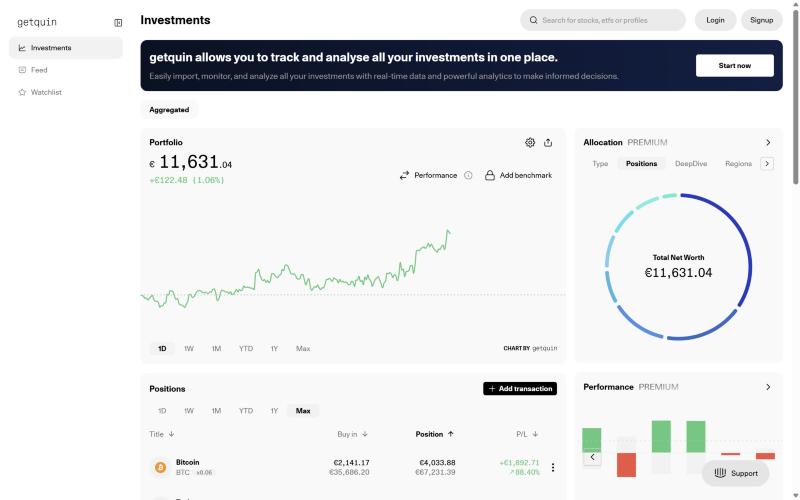
The performance panel breaks your return into price gains, dividends and realised gains, and subtracts transaction costs and taxes. It shows two metrics that many simpler trackers skip:
- Internal rate of return (IRR): your personal annual return, taking into account when you added or withdrew money
- True time-weighted rate of return (TTWROR): the return of your investments themselves, removing the effect of deposits and withdrawals. It is the right number to compare with an index or a fund
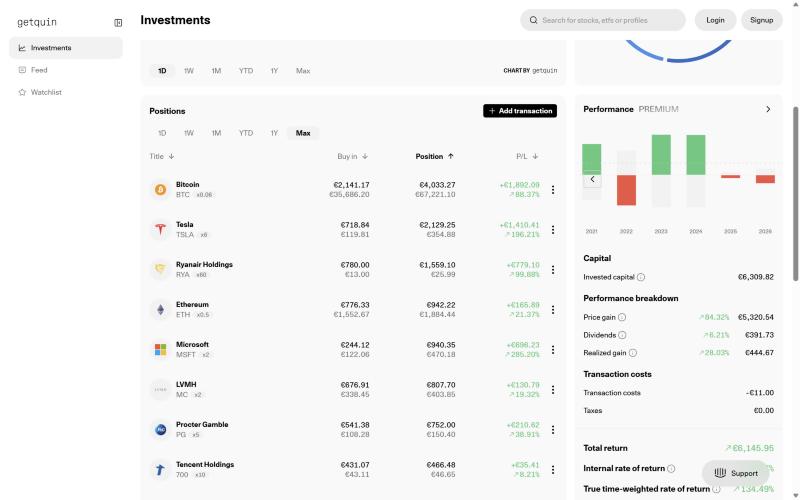
Real-time quotes come from two German exchanges, Lang & Schwarz and the Stuttgart Stock Exchange. For other periods, getquin uses each security's home exchange, crypto prices come from CoinGecko and fundamentals such as sectors and regions from FactSet (origin of data). This explains why the value in getquin can differ slightly from what your broker shows, a point Trustpilot reviewers sometimes raise.
Dividends
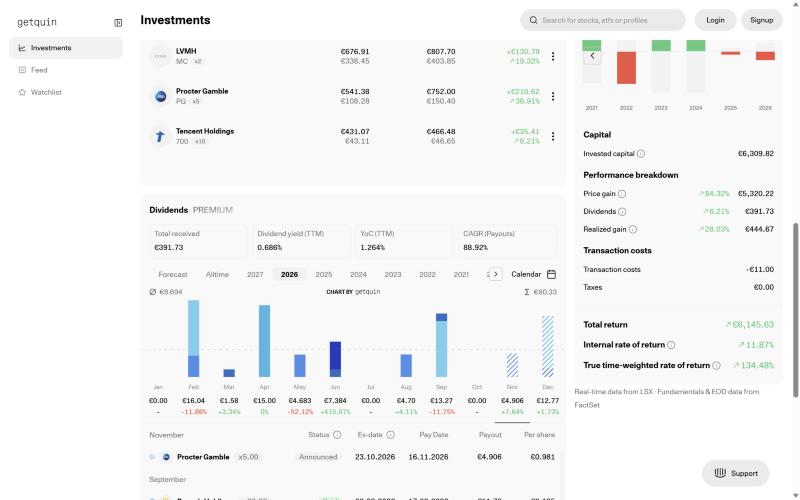
The dividend section shows total dividends received, dividend yield, yield on cost and a month-by-month chart, plus a calendar of upcoming payments with ex-date and pay date. Forecasts and personal dividend KPIs are part of Premium.
Allocation
The allocation chart splits your net worth by asset type, position and region. The "DeepDive" view goes further: it breaks the ETFs you hold into their underlying stocks, using the compositions published by ETF issuers, and adds them to your other positions. You see, for example, your total exposure to Apple across all your ETFs and single stocks. It does not yet work for every ETF or for active funds. In the app, the allocation analysis is marked as a Premium feature.
AI financial agents
getquin's AI agents answer questions about your own portfolio, such as what drove your performance, which dividends are coming or how diversified you are. Premium includes AI portfolio analysis, and Wealth gives unlimited access to the agents. getquin's terms state that AI output is for information only and is not investment advice, and that use is subject to a fair use policy.
Planning (Wealth plan)
The Wealth plan adds a retirement plan, savings goals (a home, financial independence) and scenario testing. It makes the most sense if you want getquin to be your main money app, and not only a tracker.
Security and privacy
A tracker sees a lot of personal financial data, so it is fair to ask how it is protected. Here is what getquin states:
- Hosting: data is stored on servers in Germany and Europe
- Encryption: AES-256, in transit and at rest
- Read-only access: connections cannot place orders or move money
- No data sales: getquin says it does not sell or monetise personal data
- Deletion: you can permanently delete your data in the app at any time
getquin's own help centre lists how the company is financed: venture capital, ads in the app, Premium and Wealth subscriptions, advisory fees and insurance brokerage commissions. Ads are therefore part of the business model.
Two practical points. First, as mentioned above, the AI file import sends documents to OpenAI unless you switch it off. Second, getquin is a software company, not a bank or a broker: it never holds your money or securities, which stay with your broker and are protected by that broker's own investor compensation scheme. If getquin shut down, you would lose the tracker, not your investments.
What users say
Ratings are good on the app stores and lower on Trustpilot:
Sources: Apple App Store (Germany), Google Play and Trustpilot, checked 11 November 2026.
Users praise the design, the ease of combining several brokers and the analytics. The most common complaints are broker syncs that fail or lag (XTB and Trading 212 are mentioned), prices that differ from other platforms, limited currency options and errors that take long to be fixed.
getquin vs alternatives
getquin is one of several trackers popular with European investors. Here is how the main options compare on price and focus:
Sources: pricing pages of each provider, checked 11 November 2026. Snowball Analytics prices in USD, Sharesight UK prices in GBP including VAT.
getquin's strongest card is the free plan: no other tracker in this table gives you unlimited automatic connections for free. Parqet is the closest rival in Germany and offers more analysis in its paid plans, but its free plan is limited to 2 integrations. If dividends are your main focus, Snowball Analytics is built around them.
If you prefer to keep your data on your own computer, Portfolio Performance is free and open source, at the cost of a less polished experience.
Who is getquin for?
Investors with accounts at several brokers
If you have, for example, ETFs at Trade Republic, stocks at Interactive Brokers and cash at a bank, getquin puts it all in one view for free. This is the main reason to use it.
Dividend investors
The dividend calendar is free, and Premium adds forecasts and yield metrics. It is a cheaper option than most dividend-focused trackers.
Investors who want their full net worth
Because you can add cash, debts, mortgages and manual assets, getquin can show your real net worth and not only your brokerage balance.
Who getquin is not for
- Investors who need a complete transaction history from day one through an automatic connection (you will need file imports for that)
- Investors who prefer that no data leaves their device (look at Portfolio Performance instead)
- Investors who need tax reports for their country (getquin can deduct an estimated tax on dividends, but we found no tax report feature)
Final verdict: is getquin worth it in 2026?
For most European investors with more than one account, yes. The free plan is the most generous among the trackers we compared: unlimited broker and bank connections, real-time data and a net worth view, with read-only access and data hosted in Europe. The performance metrics (IRR and TTWROR) are more serious than in many rival apps.
The weak points are practical: automatic connections often miss your history, the trial turns into an annual subscription if you forget to cancel, and the AI import sends files to OpenAI unless you switch it off. Premium, at €89.99 per year, makes sense mainly for dividend investors and for those who want to look inside their ETFs. The Wealth plan and the €499 advisory service are add-ons that most DIY investors will not need.
Our recommendation: start with the free plan, connect your brokers and see if the data is accurate for your accounts before paying for anything.
Frequently asked questions
Is getquin free?
Yes. The free plan has no time limit and includes unlimited bank and broker connections, real-time data, a net worth overview and basic portfolio analysis. Premium (€89.99/year) and Wealth (€149.99/year) add analysis, dividend forecasts, planning and AI agents.
Is getquin safe?
getquin has read-only access to your accounts, so it cannot trade or move money. Data is hosted in Germany and Europe with AES-256 encryption, and getquin states it does not sell personal data. Your investments stay with your broker.
Does getquin work with Trade Republic?
Yes. You can connect Trade Republic automatically or, since April 2026, import its CSV export to bring in your transaction history.
Does getquin support crypto?
Yes. Crypto such as Bitcoin and Ethereum is tracked with prices from CoinGecko (the demo portfolio holds both). The file import does not bring in crypto transactions, so crypto comes from a connected account or manual entry.
How do I cancel getquin Premium?
Switch off automatic renewal in your account settings, or cancel through the App Store or Google Play if you subscribed there. Access stays until the end of the paid period.
Disclaimer: This article is for informational purposes only and does not constitute financial advice. Investing involves risk, including the potential loss of your invested capital. Prices and features may change: check getquin's website before subscribing.