Sharesight review 2026: is this portfolio tracker worth it?



In this review, we look at Sharesight, a web-based portfolio tracker from New Zealand that calculates your real return across brokers, currencies and dividends. We cover what the free plan includes, how much the paid plans cost in Europe, how each major European broker connects, which tax reports you get and which alternatives may suit you better.
In November 2026, Anthropic also launched Personal Finance in Claude, which links bank, card, loan and investment accounts and answers questions about your money. It is not an option for European investors yet: the beta is limited to paid Claude plans in the US and to US banks, and for investment accounts it reads the balance, not your holdings or trades. We compare both in the alternatives section below.
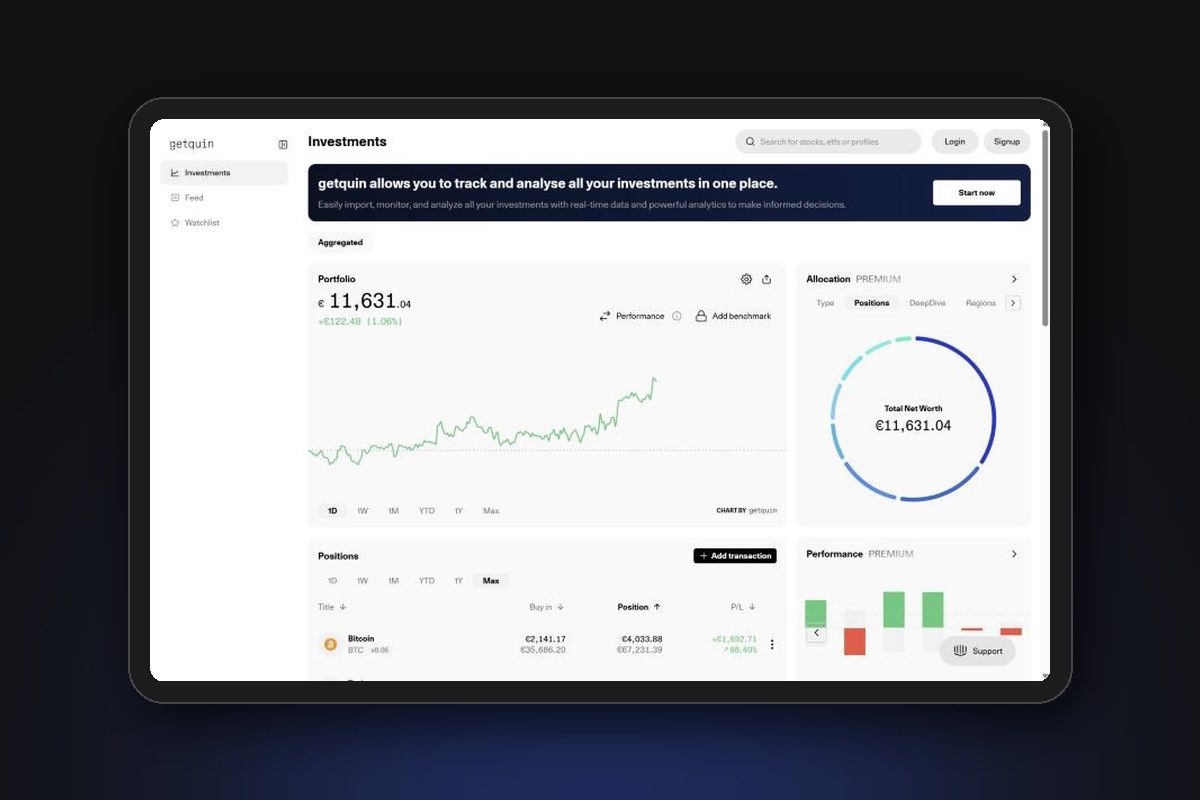
All prices and features below were checked on Sharesight's website and help centre in November 2026. Sharesight does not let you see its app without an account, so the screenshots come from its public website.
Overview
Sharesight is run by Sharesight Ltd, a company that started in New Zealand in 2006, when a father and son began building a better way to track shares. The service went online in 2008 and today has offices in Wellington and Sydney. Sharesight says more than 500,000 investors have used it, and its about page counts over 200,000 active investors in more than 150 countries.
The idea is to replace the spreadsheet many investors keep next to their broker accounts. You add your trades once, by broker sync, email or file, and Sharesight calculates your total return, including dividends and currency movements, over any period you choose:
- Stocks, ETFs and funds on more than 60 markets, plus crypto
- Cash accounts and unlisted assets such as property, which you add by hand
- Dividends, dividend reinvestments and share splits, added automatically
- Several portfolios, for example one per broker or one per family member, on the paid plans
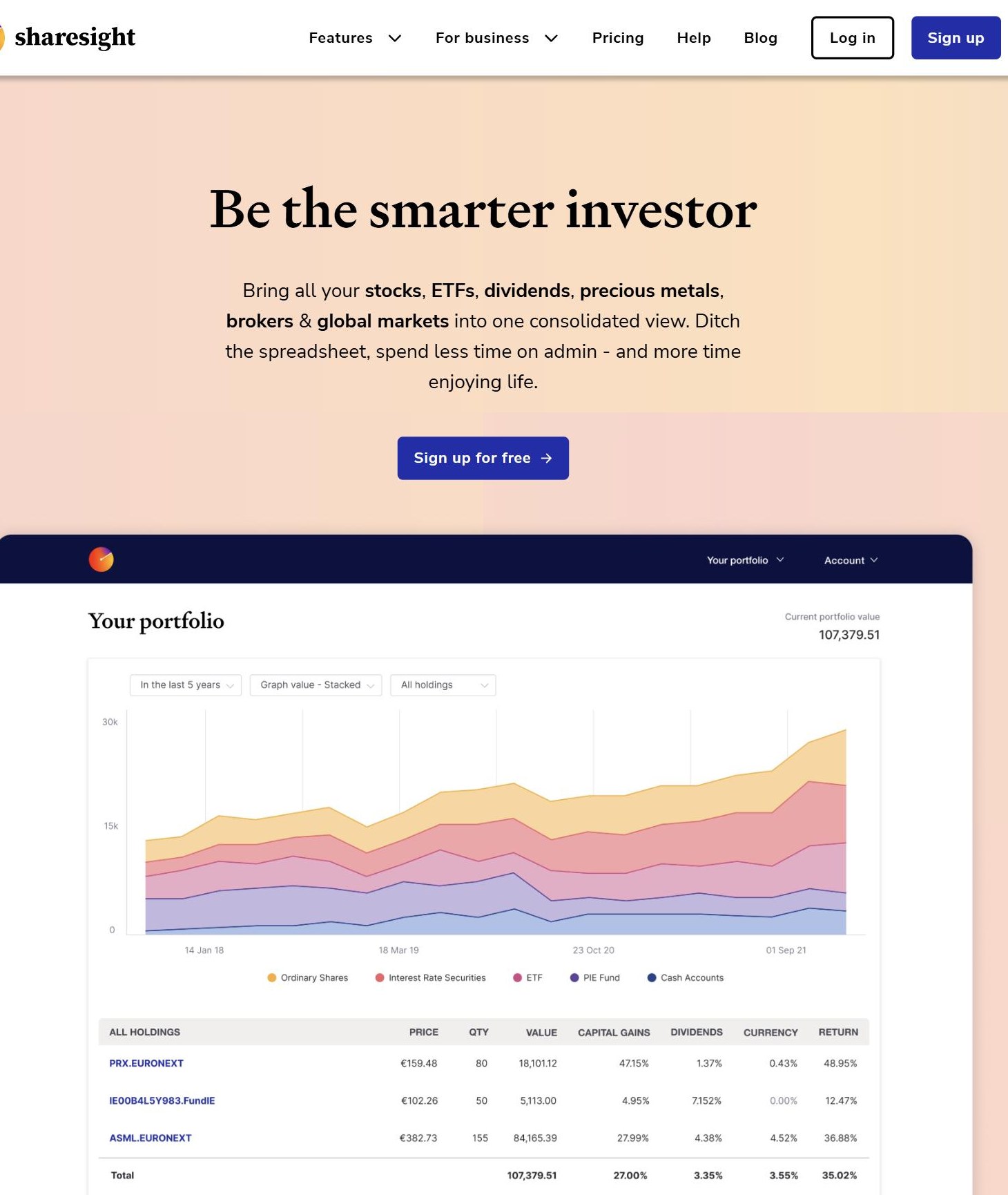
Sharesight is built for the web first. A mobile app for iOS and Android only arrived in 2025, and it is mainly a viewer for your portfolios and a watchlist.
Highlights
| Metric | Details |
|---|---|
| Price (Europe) | Free: €0. Starter: €7/month. Standard: €17/month. Premium: €23/month, billed yearly, VAT included¹ |
| Free plan | 1 portfolio, 10 holdings (closed positions count), no tax reports¹ |
| Free trial | None for paid plans: the free plan works as an unlimited trial¹ |
| Broker connections | 200+ brokers and apps, through API sync, trade confirmation emails or file import² |
| Markets covered | 60+ markets, 700,000+ stocks, ETFs and funds³ |
| Return method | Annualised money-weighted return, split into capital gain, dividends and currency gain⁴ |
| Tax reports | Taxable Income, Sold Securities, All Trades. No UK capital gains report⁵ |
| Platforms | Web app, plus iOS and Android apps for viewing. English only |
| Security | SOC 2 and GDPR compliant, optional two-factor authentication³ |
| Ratings | 3.8/5 Trustpilot (628 reviews), 3.3/5 App Store (UK), 2.6/5 Google Play |
| Company | Sharesight Ltd, New Zealand. Offices in Wellington and Sydney |
Sources: (1) Sharesight pricing page (Europe), (2) Sharesight brokers and apps, (3) Sharesight features page, (4) help centre, return calculation, (5) help centre, CGT report UK. Ratings from Trustpilot, the Apple App Store (UK) and Google Play. All checked November 2026.
Pros and cons
Pros
- Shows your real return, with dividends, fees and currency movements included and split into separate figures
- Dividends, dividend reinvestments and share splits are added automatically
- Strong multi-currency support: you choose your tax residency and base currency, and Sharesight tracks the currency impact on foreign holdings
- Automatic API sync for Interactive Brokers and Trading 212
- Custom tax year and income reports you can share with your accountant
- A long track record (online since 2008), SOC 2 compliant
- Read-only: Sharesight cannot hold, move or withdraw your money
Cons
- The free plan stops at 10 holdings, and closed positions count towards the limit
- Paid plans cost more than most rivals: €84 per year for Starter and €204 per year for Standard
- No UK capital gains tax report, and no report built for Dutch or Polish tax returns
- Many European brokers (DEGIRO, Trade Republic, Scalable Capital, XTB, Revolut) need email forwarding or file uploads, not an automatic sync
- The mobile app is new and limited, with low store ratings
- English only
Pricing: Free vs Starter vs Standard vs Premium
Sharesight has four plans for individual investors, plus a Business plan for advisers and accountants. Prices on the European page are in euros and include VAT. Paying yearly saves about 25%.
| Plan | Yearly billing | Monthly billing | Limits |
|---|---|---|---|
| Free | €0 | €0 | 1 portfolio, 10 holdings, 1 custom group |
| Starter | €7/month (€84/year) | €9.33/month | 1 portfolio, 30 holdings, 3 custom groups |
| Standard | €17/month (€204/year) | €22.67/month | 4 portfolios, unlimited holdings, 5 custom groups |
| Premium | €23/month (€276/year) | €30.67/month | 10 portfolios, unlimited holdings, 10 custom groups |
Source: Sharesight pricing page (Europe), November 2026. Prices in EUR including VAT. Holding limits include closed positions.
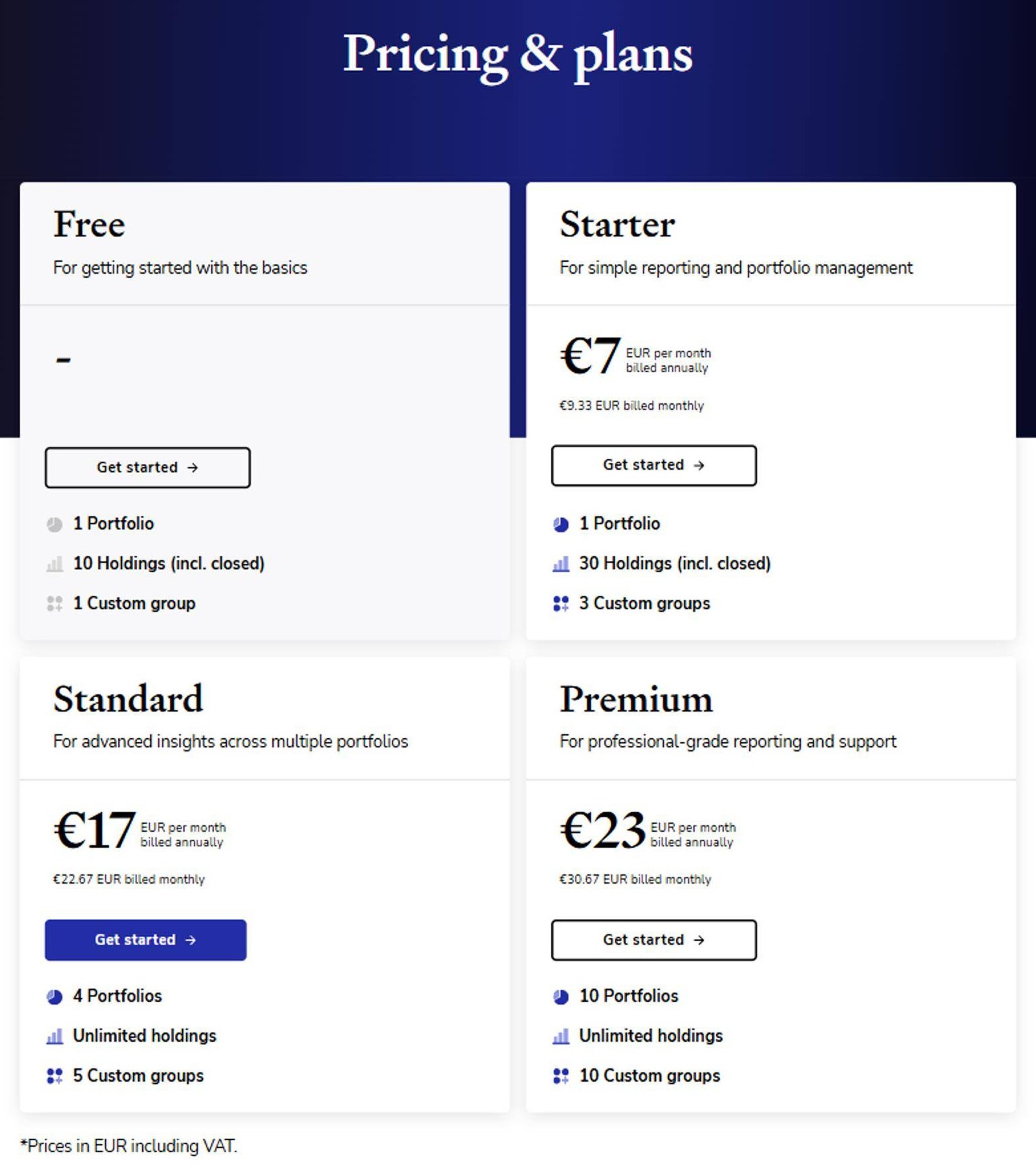
In the UK, the same plans cost £6, £14 and £21 per month on yearly billing (£8, £18.67 and £28 on monthly billing), VAT included.
What each plan adds
- All plans: performance report, sold securities report, all trades report, automatic dividends and corporate actions, price and portfolio email alerts, trade confirmation email imports, unlisted investments and portfolio sharing
- Starter and above: tax reports, diversity and exposure reports, file attachments
- Standard and above: future income, contribution analysis, multi-currency valuation and drawdown risk reports, labels and report filters, Xero integration
- Premium only: multi-period reporting
Is there a free trial?
Sharesight does not offer a trial of the paid plans. Instead, the free plan has no time limit, and free users get a demo portfolio with sample data to preview the advanced reports. You can upgrade or downgrade at any time, and billing adjusts accordingly.
Which plan do you need?
The 10-holding limit is the main reason people upgrade. Closed positions count too, so if you have sold a few stocks over the years, you can hit it quickly. A simple portfolio of 2 to 5 ETFs fits in the free plan. Starter is enough for up to 30 holdings in one portfolio. Standard makes sense if you want separate portfolios (for example one per broker or per family member), unlimited holdings or the future income report for dividends.
How importing works
Sharesight offers four ways to get your trades in. Which one you use depends on your broker.
1. Automatic broker sync
For a few brokers, Sharesight connects directly. With Interactive Brokers, you create a Flex Web Service token in your IBKR account and link it to a portfolio. New trades then sync twice a day once they settle. Past trades are not included, so you upload them once as a CSV file. The IBKR token must be renewed every year, or the sync stops. Trading 212 connects through SnapTrade, and you can choose to import your history when you set it up.
2. Trade confirmation emails
Each portfolio has its own email address. You forward the trade confirmation emails from your broker, and Sharesight adds the trades. This is how DEGIRO, Trade Republic, Scalable Capital and ABN AMRO work. It covers new trades only, so you import your history once from a spreadsheet.
3. File import
For brokers without a sync or email support, you download a CSV or Excel file from the broker and upload it through "Upload via broker". XTB, Revolut, BUX and eToro work this way, and you repeat the upload when you make new trades.
4. Manual entry
You can add any trade by hand, as well as cash accounts and unlisted assets such as property.
How European brokers connect
| Broker | New trades | Past trades |
|---|---|---|
| Interactive Brokers | Automatic sync, twice a day | CSV upload |
| Trading 212 | Automatic sync (SnapTrade), emails or CSV | Optional at setup, or CSV |
| DEGIRO | Trade confirmation emails | CSV upload |
| Trade Republic | Trade confirmation emails | Spreadsheet upload |
| Scalable Capital | Trade confirmation emails (English or German) | Spreadsheet upload |
| Saxo | Forward each trade confirmation PDF | Excel upload |
| XTB | CSV upload | CSV upload |
| Revolut | Statement upload | Statement upload (holdings transferred in must be added by hand) |
| eToro | CSV upload (CFDs, commodities and currencies are not supported) | CSV upload |
Source: Sharesight broker guides for each broker, November 2026. Short selling is not supported in the Interactive Brokers and Trading 212 integrations.
In practice, only Interactive Brokers and Trading 212 users get a hands-off setup. With DEGIRO or Trade Republic, the email forwarding works well once you set up a forwarding rule in your mailbox. With XTB or Revolut, you have to remember to upload a new file. If you use one of the brokers we review, such as Interactive Brokers, Trading 212, DEGIRO or Trade Republic, check its guide on the Sharesight website before you start.
Features
Performance: the main reason to use Sharesight
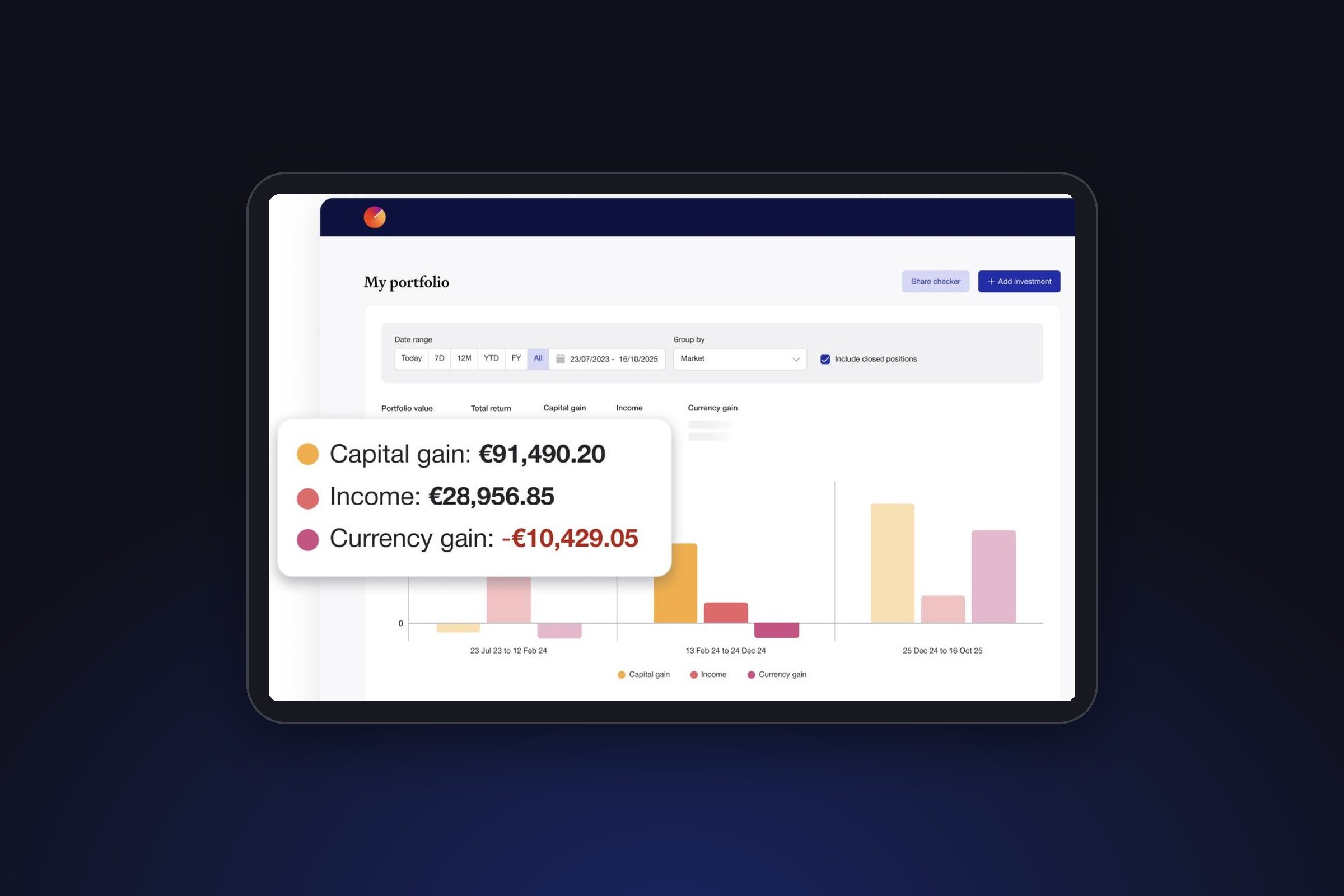
Most broker apps show a simple gain or loss on the price you paid. Sharesight splits your total return into capital gain, dividends and currency gain, and takes brokerage fees into account. Returns are money-weighted, using the Modified Dietz method, so the timing of your deposits counts.
Returns over periods longer than a year are shown as annualised figures, so you can compare holdings bought at different times. Returns under a year are not annualised. This is why a holding can show a different percentage in Sharesight than in your broker app.
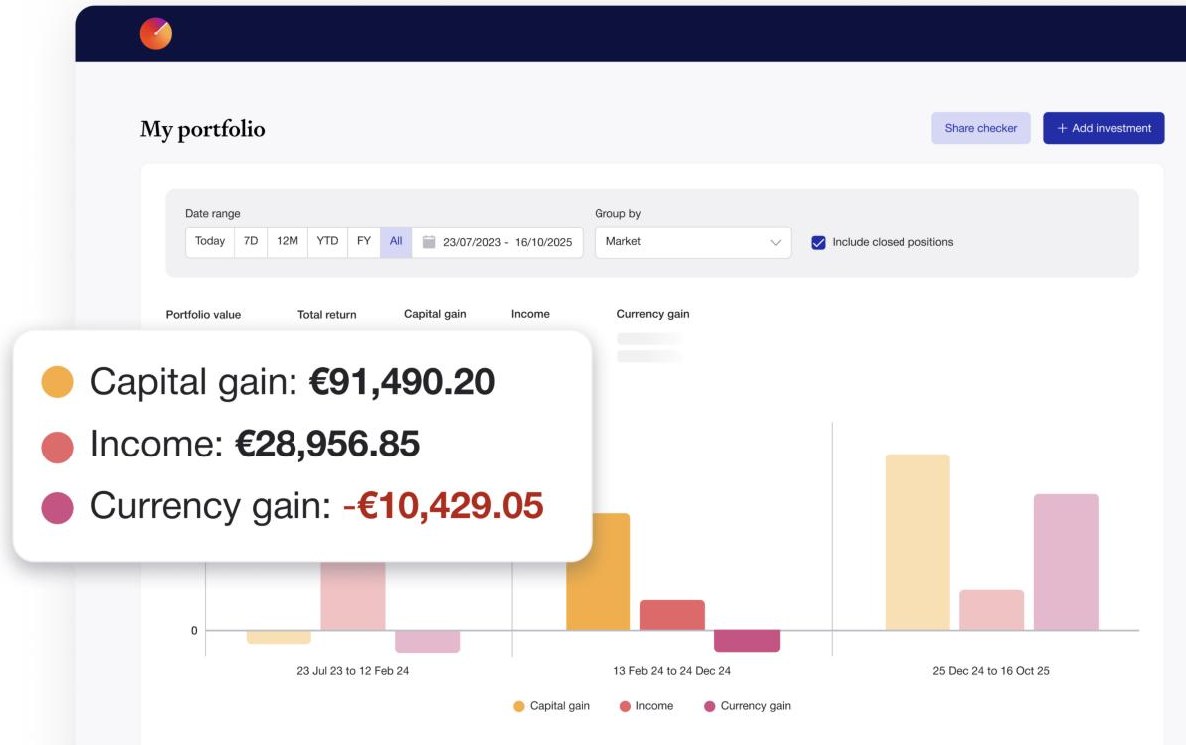
You can benchmark your portfolio against any stock, ETF or fund that Sharesight supports, and group the performance by country, market, sector or your own custom groups (for example "core ETFs" and "single stocks").
Dividends and corporate actions
Sharesight adds dividends, dividend reinvestments and share splits automatically for listed holdings. On the Standard plan, the future income report estimates your coming dividend payments.
Multi-currency tracking
You set your tax residency, which also sets your base currency (for example EUR or GBP). Sharesight then shows how much of the return on a US stock came from the share price and how much from the dollar. Sharesight treats crypto as a currency, so changes in a coin's price show up as currency gain, not capital gain.
Reports
Reports are where Sharesight is strongest. The diversity report shows your allocation, the exposure report lists the stocks inside the ETFs you hold next to your direct holdings (useful to spot overlap between ETFs), the contribution analysis shows which holdings drove your return, and the drawdown risk report compares each holding's annualised return with its largest fall from a peak (maximum drawdown). Not all reports are available on every plan (see the pricing section above).
Tax reports
Sharesight offers three reports that help with a tax return:
- Taxable Income Report: dividends, distributions and interest, split into local and foreign income
- Sold Securities Report: realised gains on positions you sold, using the average cost
- All Trades Report: every buy and sell in a tax year
You can set a custom tax year that matches your country, and share the reports with your accountant. There are limits, though. Sharesight does not offer a capital gains tax report for UK portfolios, so it does not apply the UK share matching rules. It also has no report built for country-specific returns elsewhere in Europe. The free plan has no tax reports at all.
Mobile app
Sharesight released its iOS and Android apps in 2025. They let you view your portfolios, check your holdings and keep a watchlist, but most of the work (importing, reports, settings) still happens on the website. Store ratings are low: 3.3/5 on the UK App Store and 2.6/5 on Google Play, with some long-time users saying the new app needs more clicks than the old one.
Security and privacy
- Compliance: Sharesight says it is SOC 2 and GDPR compliant
- Login: optional two-factor authentication
- No access to your money: Sharesight is a tracking and reporting service, not a bank or broker, and cannot deposit, hold, transfer or withdraw money or securities
Your investments stay with your broker and are covered by that broker's investor protection. If Sharesight shut down, you would lose the tracker, not your investments.
What users say
| Platform | Rating | Number of ratings |
|---|---|---|
| Trustpilot | 3.8/5 | 628 |
| App Store (UK) | 3.3/5 | 7 |
| Google Play | 2.6/5 | 59 (10,000+ downloads) |
Sources: Trustpilot, Apple App Store (UK) and Google Play, checked 11 November 2026.
On Trustpilot, users praise how easy it is to see their performance and dividends in one place. The most common complaints are about price, which some users find too high, and customer service, which gets mixed reviews.
Sharesight vs alternatives
| Tracker | Free plan | Paid from | Best for |
|---|---|---|---|
| Sharesight | Yes, 10 holdings | €7/month (billed yearly) | Accurate multi-currency returns and reports |
| getquin | Yes, unlimited connections | €89.99/year | All-in-one net worth with European brokers |
| Parqet | Yes, 1 portfolio and 2 integrations | €11.99/month | Detailed analytics, German-speaking investors |
| Snowball Analytics | Yes, 10 holdings, no broker sync | €79.99/year | Dividend investors |
| Portfolio Performance | Free, open source | n/a | DIY investors who want a desktop app and local data |
| Claude Personal Finance | No, paid Claude plan only | Claude Pro (US only, beta) | US residents who want to ask about spending and balances |
Sources: pricing pages of each provider, checked 11 November 2026. Claude Personal Finance: Anthropic help centre.
Sharesight's strength is the quality of its return figures and reports. getquin is the better choice if you want many broker connections for free, and it works better on mobile. Snowball Analytics is cheaper for dividend investors. Portfolio Performance calculates similar returns for free, but you do all the work on your own computer.
Can Claude replace a portfolio tracker?
Not yet, at least in Europe. Personal Finance in Claude is a beta for Claude Pro, Max and Ultra subscribers in the US, and it can only link US banks. Even there, Claude reads the balance of an investment account but not your holdings, trades or dividends, so it cannot calculate your return, split it by currency or produce a tax report. Anthropic also says the feature is not designed to give investment advice.
Where Claude helps today is analysis: you can export a report from Sharesight and ask Claude, or another AI assistant, to explain what drove your return or compare your allocation with a benchmark. A tracker keeps the data up to date automatically, and an assistant helps you understand it. If Anthropic extends Personal Finance to European accounts and holdings, we will update this review.
Who is Sharesight for?
Investors with foreign holdings
If you hold US stocks or ETFs in other currencies, Sharesight shows how much of your return came from the currency. Few trackers split this out as clearly.
Investors who want accurate, comparable returns
Because returns are money-weighted and annualised, you can compare holdings bought at different times, and compare your portfolio with a benchmark.
Investors who share figures with an accountant
The income and sold securities reports, the custom tax year and portfolio sharing save time at tax season, even if they do not produce a finished tax form.
Who Sharesight is not for
- Investors who want a free tracker for more than 10 holdings
- Investors who mostly use their phone
- UK investors who need a ready capital gains tax calculation
- Investors whose brokers only offer file uploads, if they do not want to upload new files regularly
Final verdict: is Sharesight worth it in 2026?
Sharesight is one of the most accurate trackers for investors with several currencies and brokers. Its return figures include dividends, fees and currency movements, and its reports go further than most rivals. The automatic sync with Interactive Brokers and Trading 212 works well.
The downsides are price and convenience. The free plan stops at 10 holdings, Standard costs €204 per year, many European brokers rely on email forwarding or file uploads, and the mobile app is basic. UK investors should also know there is no capital gains tax report.
Our recommendation: start with the free plan and the demo portfolio, add your largest holdings and see if the reports are worth the price for you. If you mainly want to see everything in one place for free, getquin is the cheaper option.
Frequently asked questions
Is Sharesight free?
Yes, for up to 10 holdings in 1 portfolio, with no time limit. Closed positions count towards the limit. Paid plans in Europe cost from €7 per month on yearly billing.
How much does Sharesight cost in Europe?
Starter costs €84 per year, Standard €204 per year and Premium €276 per year, VAT included. Monthly billing costs about a third more.
Does Sharesight work with DEGIRO?
Yes, but not through an automatic sync. You upload your past trades as a CSV file and forward DEGIRO's trade confirmation emails to your portfolio's email address for new trades.
Does Sharesight work with Trading 212 and Interactive Brokers?
Yes. Both connect automatically: Interactive Brokers through a Flex Web Service token and Trading 212 through SnapTrade.
Does Sharesight calculate UK capital gains tax?
No. Sharesight's help centre says it does not offer a capital gains tax report for UK portfolios. It does offer a Taxable Income Report for dividends and a Sold Securities Report.
Is Sharesight safe?
Sharesight says it is SOC 2 and GDPR compliant and offers two-factor authentication. It cannot move or withdraw money, and your investments stay with your broker.
Disclaimer: This article is for informational purposes only and does not constitute financial advice. Investing involves risk, including the potential loss of your invested capital. Prices and features may change: check Sharesight's website before subscribing.